


If you've ever tried to track down where your images end up online, you know it's a nightmare. Manual searching takes forever, and you're bound to miss stuff. That's the problem Copyseeker set out to solve—and today, it just got a whole lot easier with the release of an official n8n community node.
The node is live on npm: https://www.npmjs.com/package/n8n-nodes-copyseeker
What's the big deal?
n8n is one of the most popular workflow automation tools out there, and now Copyseeker users can plug reverse image search directly into their automations. No coding required. Just drag, drop, connect, and let it run.
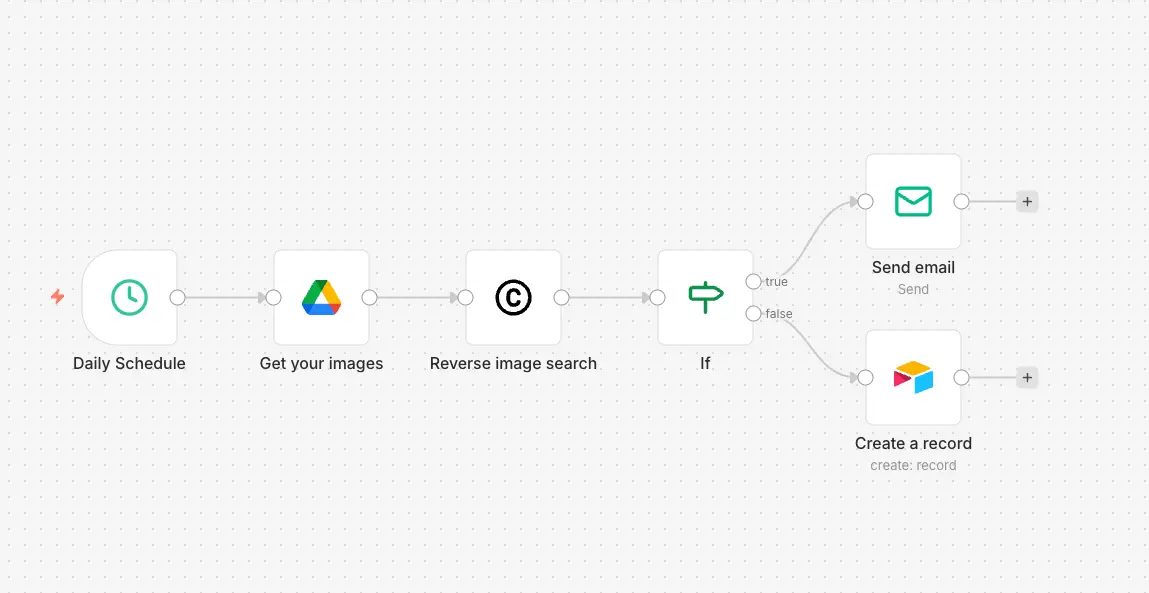
Think about what that means in practice. A photographer can set up a workflow that checks their portfolio images every morning, flags any new matches, and sends an email if something pops up. An e-commerce brand can monitor their product photos for knockoffs on competing sites. A marketing team can track where their campaign visuals spread across the web.
All of this runs in the background without anyone lifting a finger.
Why this matters
"I built Copyseeker because I was frustrated with how hard it was to find where images show up online," said Mantas, who runs the service. "The API was the first step. But most people don't want to write code just to check if someone's using their photos. The n8n node changes that—now anyone can set up automated monitoring in minutes."
The timing makes sense. Visual content theft is everywhere, from scraped blog images to stolen product photos on shady marketplaces. Creators and businesses need better tools to stay on top of it, and manual searches just don't cut it anymore.
What you can actually do with it
Here's where it gets practical:
Set up a daily scan of your image library and get Slack alerts when matches appear. Log everything to a Google Sheet or Airtable for documentation. Build a workflow that checks new product images right after upload. Combine it with other n8n nodes to create something more complex—like auto-generating takedown request drafts when high-confidence matches are found.
The node takes image URLs, runs them through Copyseeker's search, and returns match data including where the image was found, similarity scores, and page info. From there, you route it wherever you need.
Getting started
The node works with any self-hosted n8n instance or n8n Cloud (with community nodes enabled). You'll need a Copyseeker API key from RapidAPI, and then you're good to go.
Installation is straightforward—just search for "copyseeker" in the n8n community nodes or grab it directly from npm.

Source(s) : MB AI Brothers